Friday, August 13, 2010

Lines Styles and staring over again

Well, it sometimes happens that you are almost there and you should just add those 2% and you find that little something that you think you will need or you should put in there. And even if your schedule tells you to leave it out, you can't sleep at night, awake staring at the white roof of your room.

Well, this is what happened to me, since I wanted to make the uDig style editor from the merging of SLD into the QGIS gui design. So I decided, as you probably saw in my latest posts, that there had to be something called rules which would represent a style property for a certain geometry.

In SLD there are things called FeatureTypeStyle and Rule. And later I will show you also what they can infuence.

For now let's start with a simple road-map.


Which in the editor looks like:


You might note that the rules list if now a tree viewer. Whan looking at the tree viewer think of the following mapping:

root elements = groups = FeatureTypeStyle
children elements = rule = Rule

For some that might sound strange, but I know some will understand :)

Alright, let's add a second rule that has a line a bit thicker then the first, in order to give the feeling of a line with black border.


We now have a group with two rules, which will result in:


And exactly here lies the problem. Do you see the ugly overlapping of the roads?

If we instead do the same with two groups and one rule per group:


we gain the wanted result:


if we then also take care a bit of the caps and joins of the lines it looks even better:


To end the thing with some more fun, let's play with the dashing of the lines.

We first set the dash of the red line to 40.0, 40.0:


and let's also add some ticks to make it nicer:


And here we go:


Well, we have again the overlapping problem... so we try to split in more groups:


which is better, but we still have problems on the line ends:


Well, at the end I also did a try with graphics stroke, but that one is not yet well supported in the geotools 2.6 series, which is on what uDig 1.2 bases on:


They say geotools 2.7 has better support for graphics strokes, so that will be available in uDig 1.3.

Saturday, August 7, 2010

Themed Styles are back in time for 1.2 release

Those that were using the release candidates of uDig and were interested in style might have noticed that the themed style editor got quite buggy.

In the final rushes of the 1.2.0 release of uDig we fixed all of it (that we noticed) and also added a couple of enhancements.

First of all, icons were all black and didn't show the geometry type.
Now we see polygons being like this:


and points like this:


we also note differences between the point mark type:


One thing I was really finding blocking was the fact that only ColorBrewer colortables were supported. Well, I heard many people tell me that 12 classes of color would be enough, but then again I was asking myself why for example the standard colortable of the Corine Landcover has 45?

Well, everyone should be able to choose, so I did two things:

1) Add two dynamic colortables that adapt to the number of requested classes by colorinterpolation:


You might or might not know that the colorrules can be customized and the border color can be set.


Well, that makes Italy look a bit like the Girl in the red coat from Schnidler's List. Well, given the current political status...


2) It is now possible to add custom colortables to uDig. In my example I added the Corinne Landcover colortable:


Well, I have to add something that will come through the new style editor that is in progress :)

So let's for example start with the cities layer and create a theme with the population rank as unique value (which also was added right now).


Then let's jump into the new points panel, were we find the different rules of the theme as expected. In the General Properties of each rule we then set the size to be field based:


The result is a theme that also sets the size:

Friday, August 6, 2010

Fun playing with the new style editor

Well, I am currently trying to fix glitches on the themed editor of udig. While doing this I got into a combined playing with the themed editor page and the new point editor page I am developing :)

Here is what might happen:

1) Create a simple point style


2) Switch to the theme editor and make it a range style


3) How does it look in the new point editor? Well, as assumed, it separates the rules and makes them available separately


4) So let's do something with the rules :)


5) Which wil result into this


6) Which then you might decide to put into your symbol library?


And I thought at first SLD would not be fun :)

Thursday, August 5, 2010

PreferenceConverter

I was wondering how to save colors or non int/double/boolean/string values into rcp preferences. As usual it is very easy if you know the tool to use. :)

So from Color -> Preference

IPreferenceStore store = ...
Color red = Display.getDefault().getSystemColor(SWT.COLOR_RED);
PreferenceConverter.setDefault(store, "COLOR_KEY", red.getRGB());


And back: Preference -> Color

RGB colorRgb = PreferenceConverter.getColor(store, "COLOR_KEY");
Color red = new Color( Display.getDefault(), colorRgb);


Same applies for example for Fonts or Rectangle and other nice things.

Tuesday, July 13, 2010

Work in progress on the new style editor

To be honest I thought that creating a style editor would be less work. But Style is style, and once you get into it you would want more and more. So it ends up that only to think about simple points, there are thousands of possibilities...

Well, it is a work in progress, but it is already possible to create quite complex styles and save them in an own library.

Well, to give you an idea...


and graphics based (png, svg)...


Well, still a long way to go after this... categories, labels, lines and polygons...

Thursday, July 1, 2010

java.lang.NoClassDefFoundError: javax/media/jai/iterator/RandomIter

Man, this is the last time you fool me!
At least so I wished... anyways...
You are writing an eclipse RCP application that bases also on JAI?

Well, you might incur into the error:
java.lang.NoClassDefFoundError: javax/media/jai/iterator/RandomIter

or something similar.
Also you would swear that the jars are in your classpath.
Also you will browse the whole internet for solutions.
Also you won't find them. (at least I didn't)
Because the ease of all this is in running the application with the following VM argument:

-Dosgi.parentClassloader=ext


When I don't create new RCP apps in a while it fools me again. Also you should not try to solve this between 11 pm and 1 am. It would fool you... again.


As suggested a small addition: In my case the problem is due to the fact I use to keep the jai jars inside the jre and therefore it is needed to tell the classloader to load also the jre extentions (which is where I keep the jars).

Thursday, June 17, 2010

New database manager for BeeGIS

It has been a while, a long while. I have been busy with my car accident (that sucks) and everything that comes after that (which, onces you were so lucky to come out well from the crash, seems to suck even more :)).

But a lot of stuff is going on around JGrass and BeeGIS and even if for now I want to keep things around JGrass secret, there are good news for BeeGIS I want to tell.

Recently the guys of the Regional Environmental Agency of the Italian Region Piemont (ARPA Piemonte) contracted HydroloGIS to make several bugfixes and several big enhancements on BeeGIS since they want to use it for their digital field mapping (which is AWESOME!!).

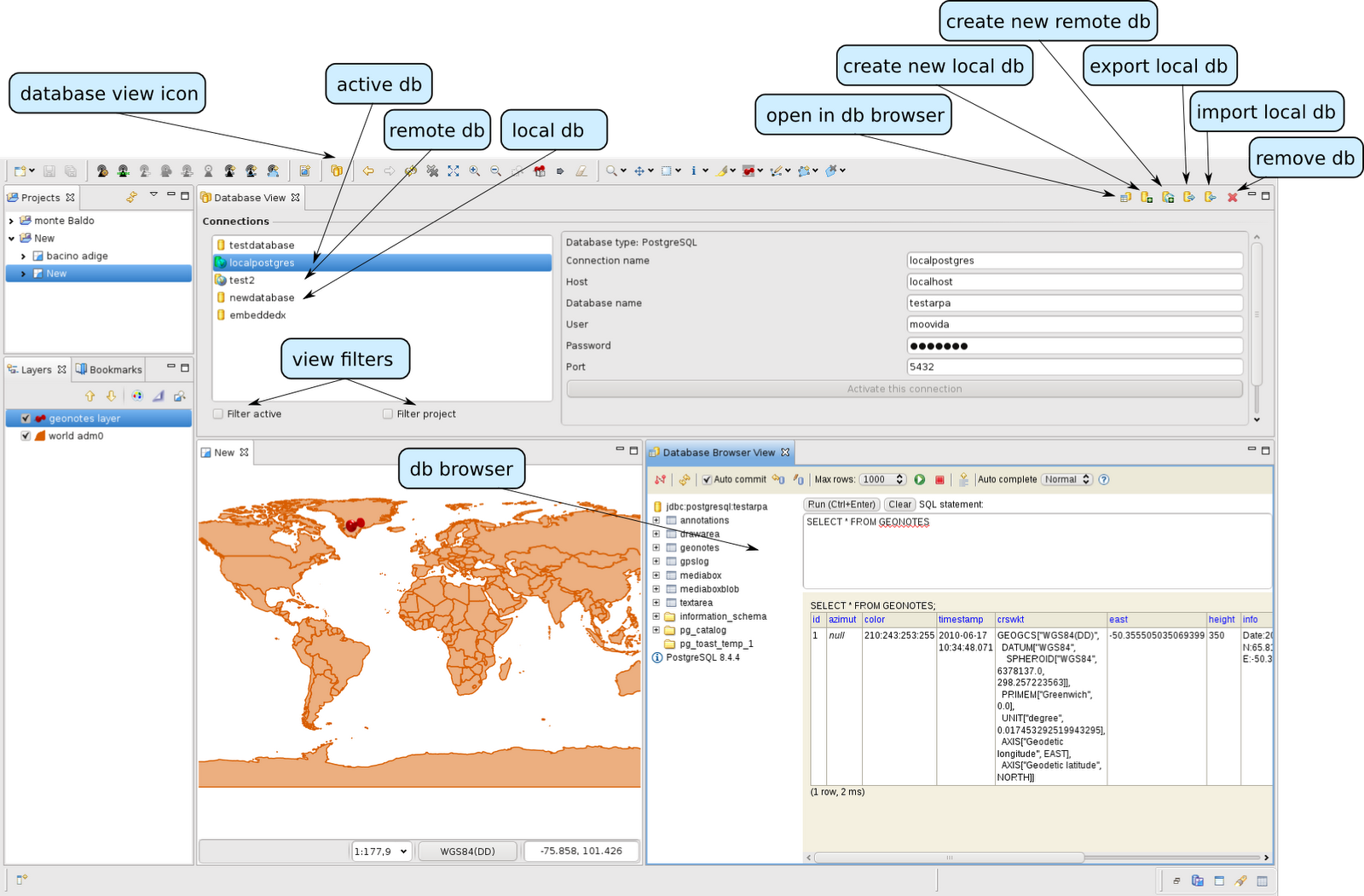
Well, I won't make a list of the things that will be done now, but I want to show you the first nice thing that is getting from that: The database manager. Since BeeGIS works with embedded databases (it can also with remote, but out in the field you might be offline) you often have the need to switch between databases and quickly create new ones, export them and do whatever you want with them.
That is what the tool is there for.


A first of several nice features. Thanks ARPA...