Woa... it has been a busy time and my posting force has really dropped. There are a lot of news in the jgrasstools, uDig and open source world to tell about, but for now I will just announce this (I do not need my brain to write about certain things).
I recently got in need to be able to do some design on the road on an android tablet. So I started to search in the market and found some apps. They all were posing as gui to the really nice yUML project.
I found that an amazing idea, but the available tools didn't have certain features I felt were necessary:
* to have an editor and uml view aside of each other
* be able to easily load and save files and dump the image to disk
* be on both android and desktop
That is why I started HyUml:
It is already very usable and it is coded in really few time and with no resources, but it serves the purpose and I am having a good time with it. It is obviously open sourced, so maybe you can also make use of it.
Some snaps:
RCP Version:
Well, maybe I should add that in the lower left panel you get the html img tag text that you can put inside a wiki to have the diagram generated there. This is nifty :)
Android version:
While the android version is in the market, the rcp version has to be built as an eclipse application. For thos interested in the source code of the two projects, they are both on bitbucket on the hyuml repository.
Enjoy..
...a summary of how-to-do-(mostly-GIS)-development-things in HortonMachine-gvSIG-Geopaparazzi-uDig-Eclipse-Java as they pass me by...
That's all folks... and code!
Showing posts with label eclipse. Show all posts
Friday, November 4, 2011
Wednesday, April 27, 2011
Open the properties view
Why do I always forget? Need to nail it down.
PlatformUI.getWorkbench().getActiveWorkbenchWindow().getActivePage().showView("org.eclipse.ui.views.PropertySheet");
Monday, January 31, 2011
My latex friend Texclipse
I think I tried it once already and it wasn't mature at that time, but now I am really glad to say that the project is really nice and usable: Texlipse.
Finally a way to write my latex documentation from within my favourite IDE. While under linux setting up latex is quite easy, in windows it needs a bit more love.
Antways the configuration instructions on the texlipse site are great, so not much more to say.
The only thing I found nasty, is the fact that I need the output pdf to be built in a different folder than my source files are in. For me this is due to the fact that otherwise every time I save and it builds, the pdf is uploaded on my dropbox.

As you can see in the screen, there is a setting that tells: "bin directory of tex distribution", which should give me the possibility to change the output folder. Well, in my install, that one is not only ignored, the textfield of the folder gets blanked out after I press APPLY or OK.
An easy workaround is to add the small option to the command -output-directory=:

Good stuff from the Texlipse guys, goooood stuff!
Oh yeah, and wait, a screenshot:
Finally a way to write my latex documentation from within my favourite IDE. While under linux setting up latex is quite easy, in windows it needs a bit more love.
Antways the configuration instructions on the texlipse site are great, so not much more to say.
The only thing I found nasty, is the fact that I need the output pdf to be built in a different folder than my source files are in. For me this is due to the fact that otherwise every time I save and it builds, the pdf is uploaded on my dropbox.

As you can see in the screen, there is a setting that tells: "bin directory of tex distribution", which should give me the possibility to change the output folder. Well, in my install, that one is not only ignored, the textfield of the folder gets blanked out after I press APPLY or OK.
An easy workaround is to add the small option to the command -output-directory=:

Good stuff from the Texlipse guys, goooood stuff!
Oh yeah, and wait, a screenshot:
Thursday, August 26, 2010
SWT, Tabfolder and ScrolledComposite
Every time I have to create a scrolled tabfolder, it is the same. I have to fiddle around to make it work nicely. Around the net I can't find a good and complete example.
So here is how I solved it. Didn't have time to clean the code up. Remove objects you don't need and if you have troubles, just ping me. Hope this helps someone.
Here we go:
// create the tab folder
final CTabFolder folder = new CTabFolder(parent, SWT.BOTTOM);
folder.setUnselectedCloseVisible(false);
folder.setLayout(new FillLayout());
// for every Tab object create a tab
List orderedTabs = form.getOrderedTabs();
boolean first = true;
for( Tab orderedTab : orderedTabs ) {
So here is how I solved it. Didn't have time to clean the code up. Remove objects you don't need and if you have troubles, just ping me. Hope this helps someone.
Here we go:
// create the tab folder
final CTabFolder folder = new CTabFolder(parent, SWT.BOTTOM);
folder.setUnselectedCloseVisible(false);
folder.setLayout(new FillLayout());
// for every Tab object create a tab
List
boolean first = true;
for( Tab orderedTab : orderedTabs ) {
// the tabitem
CTabItem tab = new CTabItem(folder, SWT.NONE);
tab.setText(orderedTab.text);
if (first) {
// select the first tab
folder.setSelection(tab);
first = false;
}
// we want the content to scroll
final ScrolledComposite scroller = new ScrolledComposite(folder, SWT.V_SCROLL);
scroller.setLayout(new FillLayout());
// the actual content of the tab
Composite tabComposite = new Composite(scroller, SWT.NONE);
tabComposite.setLayout(new MigLayout(orderedTab.layoutConstraints, orderedTab.colConstraints));
// which goes as content to the scrolled composite
scroller.setContent(tabComposite);
scroller.setExpandVertical(true);
scroller.setExpandHorizontal(true);
scroller.setMinHeight(folder.computeSize(SWT.DEFAULT, SWT.DEFAULT).y);
scroller.addControlListener(new ControlAdapter(){
CTabItem tab = new CTabItem(folder, SWT.NONE);
tab.setText(orderedTab.text);
if (first) {
// select the first tab
folder.setSelection(tab);
first = false;
}
// we want the content to scroll
final ScrolledComposite scroller = new ScrolledComposite(folder, SWT.V_SCROLL);
scroller.setLayout(new FillLayout());
// the actual content of the tab
Composite tabComposite = new Composite(scroller, SWT.NONE);
tabComposite.setLayout(new MigLayout(orderedTab.layoutConstraints, orderedTab.colConstraints));
// which goes as content to the scrolled composite
scroller.setContent(tabComposite);
scroller.setExpandVertical(true);
scroller.setExpandHorizontal(true);
scroller.setMinHeight(folder.computeSize(SWT.DEFAULT, SWT.DEFAULT).y);
scroller.addControlListener(new ControlAdapter(){
public void controlResized( ControlEvent e ) {
// recalculate height in case the resize makes texts
// wrap or things happen that require it
Rectangle r = scroller.getClientArea();
scroller.setMinHeight(folder.computeSize(SWT.DEFAULT, r.height).y);
}
// recalculate height in case the resize makes texts
// wrap or things happen that require it
Rectangle r = scroller.getClientArea();
scroller.setMinHeight(folder.computeSize(SWT.DEFAULT, r.height).y);
}
});
// the scroller gets the control of the tab item
tab.setControl(scroller);
// add things to the tab composite
List< ? extends FormElement> orderedElements = orderedTab.getOrderedElements();
for( FormElement orderedGuiElement : orderedElements ) {
// the scroller gets the control of the tab item
tab.setControl(scroller);
// add things to the tab composite
List< ? extends FormElement> orderedElements = orderedTab.getOrderedElements();
for( FormElement orderedGuiElement : orderedElements ) {
FormGuiElement formGui = FormGuiFactory.createFormGui(orderedGuiElement);
formGui.makeGui(tabComposite);
}
}Thursday, August 5, 2010
PreferenceConverter
I was wondering how to save colors or non int/double/boolean/string values into rcp preferences. As usual it is very easy if you know the tool to use. :)
So from Color -> Preference
And back: Preference -> Color
Same applies for example for Fonts or Rectangle and other nice things.
So from Color -> Preference
IPreferenceStore store = ...
Color red = Display.getDefault().getSystemColor(SWT.COLOR_RED);
PreferenceConverter.setDefault(store, "COLOR_KEY", red.getRGB());
And back: Preference -> Color
RGB colorRgb = PreferenceConverter.getColor(store, "COLOR_KEY");
Color red = new Color( Display.getDefault(), colorRgb);
Same applies for example for Fonts or Rectangle and other nice things.
Monday, April 19, 2010
IFile, IFileStore and opening an EditorPart
Eclipse's engines turn around the idea of a project.
If I want to open an Editor on a file, I would have to do:
apart for the fact that IFile refers on a file inside the project, which makes sense inside eclipse, but perhaps not always in an RCP product basing on eclipse.
So to open an editor on an external (external == wherever in the filesystem != in the eclipse project) file, here is what is possible since 3.3:
If I want to open an Editor on a file, I would have to do:
IFile iFile = myIFile;
PlatformUI.getWorkbench().getActiveWorkbenchWindow().getActivePage()
.openEditor(iFile, FormEditor.ID);
apart for the fact that IFile refers on a file inside the project, which makes sense inside eclipse, but perhaps not always in an RCP product basing on eclipse.
So to open an editor on an external (external == wherever in the filesystem != in the eclipse project) file, here is what is possible since 3.3:
File f = new File(path);
IPath ipath = new Path(f.getAbsolutePath());
IFileStore fileLocation = EFS.getLocalFileSystem().getStore(ipath);
FileStoreEditorInput fileStoreEditorInput = new FileStoreEditorInput(
fileLocation);
IWorkbenchPage page = PlatformUI.getWorkbench().getActiveWorkbenchWindow()
.getActivePage();
page.openEditor(fileStoreEditorInput, FormEditor.ID);
Saturday, December 5, 2009
EPL-GPL: Open letter to the FSFEurope
Since I have enough of not knowing exactly how to deal with the
EPL-GPL problem, I am going to write to the FSFEurope for
clarification.
The letter I will send is placed here:
http://jgrass.wiki.software.bz.it/jgrass/Open_letter_to_the_fSFEurope
It will for sure change during the next days, but I plan to send it by
mid of next week.
Constructive comment are welcome!
EPL-GPL problem, I am going to write to the FSFEurope for
clarification.
The letter I will send is placed here:
http://jgrass.wiki.software.
It will for sure change during the next days, but I plan to send it by
mid of next week.
Constructive comment are welcome!
Tuesday, April 7, 2009
How to add a shortcut binding to JGrass
Alright, I wanted to be able to open the console editor by shortcut.
Here the steps to to achieve it.
1) create a command. Use the org.eclipse.ui.commands extention point to do so.
2) create a category for your new command(s) if you do not have one already. Rightclick on the extention point of point 1) , choose new and then category.
3) create a new command by rightclicking on the extention point as in point 2).
4) fill in some basic info, as name, description, category and a unique id for the command.
It should look like the following:

keep in mind the green part, we will need it later.
5) create an actionset with your action in it. Use the org.eclipse.ui.actionSets extention point.
Filling in the basic stuff will lead to the following:

Note that the blue part is the class that will actually exacute the action.
Instead the green part is the id of the command created before. The command will be the link to the shortcut binding, which we will create now.
6) create the shortcut throught the org.eclipse.ui.bindings extention point.
That would look like:

Only two things to note here:
That should be all I think.
Here the steps to to achieve it.
1) create a command. Use the org.eclipse.ui.commands extention point to do so.
2) create a category for your new command(s) if you do not have one already. Rightclick on the extention point of point 1) , choose new and then category.
3) create a new command by rightclicking on the extention point as in point 2).
4) fill in some basic info, as name, description, category and a unique id for the command.
It should look like the following:

keep in mind the green part, we will need it later.
5) create an actionset with your action in it. Use the org.eclipse.ui.actionSets extention point.
Filling in the basic stuff will lead to the following:

Note that the blue part is the class that will actually exacute the action.
Instead the green part is the id of the command created before. The command will be the link to the shortcut binding, which we will create now.
6) create the shortcut throught the org.eclipse.ui.bindings extention point.
That would look like:

Only two things to note here:
- commandid, which is again the id of the command created in 1)
- the shortcut definition in sequence: ESC M1+E which results in a vi-like shortcut: first press ESC and then ALT-E
That should be all I think.
Tuesday, March 25, 2008
How to keep track of memory status
In our field of application, heavily using raster maps and analysing them, we get into out-of-memory problems rather often. Not always these exceptions are trapped and we end up waiting for something that will never come.
So one way to keep track of all this, is the nice FreeMem plugin by Markus Oliver. It is really easy to install throught the update manager (explained in the last post).
Just enter http://www.junginger.biz/eclipse/ as your new remote update site.
Install it and restart JGrass (Udig/Eclipse, it will work for all of them). In the list of loadable views there will be a new one, the FreeMem, which will look like this:

In the list of installable plugins there is also a RSS-feed reader. Just for fun I installed it also in JGrass and inserted as test the feed to this blog :)

I love this rcp environment!
So one way to keep track of all this, is the nice FreeMem plugin by Markus Oliver. It is really easy to install throught the update manager (explained in the last post).
Just enter http://www.junginger.biz/eclipse/ as your new remote update site.
Install it and restart JGrass (Udig/Eclipse, it will work for all of them). In the list of loadable views there will be a new one, the FreeMem, which will look like this:

In the list of installable plugins there is also a RSS-feed reader. Just for fun I installed it also in JGrass and inserted as test the feed to this blog :)

I love this rcp environment!
Tuesday, March 18, 2008
How to load plugins from an update site
Imagine you want to install the very experimental and pre-pre-alpha beegis geonotes inside my current JGrass installation. What would you do?
Nothing easier than that:
1) in the help menu go on software updates -> find and install:

2) select on search for new features and go next:

3) push the New Remote Site button and enter the update site you which to install the plugin from. In this example I will use beesgis-extentions update site which is here:
http://www.beegis.org/upd-beegis/eu.hydrologis.jgrass.beegis-updatesite/

4) after clicking OK and finish, a list of available packages supplied by the update-site will appear. Select what you want to install:

5) next you will be asked to agree the licenses and so on.

6) if the packages are not signed, you will be warned and prompt about installation. If you are sure, just press install all.

7) you will be asked to restart JGrass. Do so and after restart you will find the geonotes layer in you mapgraphics and the geonotes tool in the info category tools.

The update is done. You can enjoy your new plugin.
To be honest there is one more step to go, since without the right database and database tables there is nothing to be done.
So get the database zipped from here and unzip it into some folder of your choice.
Now let's tell jgrass where the database is. Open the preferences, (Window->Preferences) and under HSQLDB server point to the unzipped geebisdatabase server:

Restart JGrass and the game is done.
PS: if you instead are interested in creating an update site for others, have a look at this nice article from the eclipse wiki.
Nothing easier than that:
1) in the help menu go on software updates -> find and install:

2) select on search for new features and go next:

3) push the New Remote Site button and enter the update site you which to install the plugin from. In this example I will use beesgis-extentions update site which is here:
http://www.beegis.org/upd-beegis/eu.hydrologis.jgrass.beegis-updatesite/

4) after clicking OK and finish, a list of available packages supplied by the update-site will appear. Select what you want to install:

5) next you will be asked to agree the licenses and so on.

6) if the packages are not signed, you will be warned and prompt about installation. If you are sure, just press install all.

7) you will be asked to restart JGrass. Do so and after restart you will find the geonotes layer in you mapgraphics and the geonotes tool in the info category tools.

The update is done. You can enjoy your new plugin.
To be honest there is one more step to go, since without the right database and database tables there is nothing to be done.
So get the database zipped from here and unzip it into some folder of your choice.
Now let's tell jgrass where the database is. Open the preferences, (Window->Preferences) and under HSQLDB server point to the unzipped geebisdatabase server:

Restart JGrass and the game is done.
PS: if you instead are interested in creating an update site for others, have a look at this nice article from the eclipse wiki.
Saturday, February 16, 2008
How to open a file with the OS standard application
SWT supplies a very nice class for this: org.eclipse.swt.program.Program
Just supply the absolute path to the file you want to open and the magic is done.
Program.launch(fullPath);
Monday, February 11, 2008
How to retrieve an image for an action or button
There are several way to achieve this:
1) many common images (undo, redo, file, folder, cut, copy) are available through the org.eclipse.ui.ISharedImages interface:
2) If you have your own image in the plugin path, with the help of AbstractUIPlugin:
The good thing is that the path is relative to the plugin containing it (in this case MyFunnyPlugin) and is URL-alike, i.e. slash on every operating system.
Sometimes all you need is the descriptor, as in the case of actions:
sometimes you need the image instead, as in the case of icons for buttons:
3) If however your resource lies in the same package of the calling class, you can exploit:
1) many common images (undo, redo, file, folder, cut, copy) are available through the org.eclipse.ui.ISharedImages interface:
Image folderImg = PlatformUI.getWorkbench().getSharedImages().getImage(ISharedImages.IMG_OBJ_FOLDER);
2) If you have your own image in the plugin path, with the help of AbstractUIPlugin:
ImageDescriptor imageDescriptorFromPlugin = AbstractUIPlugin.imageDescriptorFromPlugin(MyFunnyPlugin.PLUGIN_ID, "icons/stop.gif");
The good thing is that the path is relative to the plugin containing it (in this case MyFunnyPlugin) and is URL-alike, i.e. slash on every operating system.
Sometimes all you need is the descriptor, as in the case of actions:
Action stopGpsAction = new Action(){
public void run() {
// stop that thing
}
};
stopGpsAction.setImageDescriptor(imageDescriptorFromPlugin));
sometimes you need the image instead, as in the case of icons for buttons:
Button stop = new Button(commandGroup, SWT.PUSH | SWT.BORDER);
stop.setImage(imageDescriptorFromPlugin.createImage());
3) If however your resource lies in the same package of the calling class, you can exploit:
ImageData imageData = new ImageData(getClass().getResourceAsStream("legenda_pioggia.png"));
Image image = new Image(display, imageData);
Thursday, February 7, 2008
How to properly log errors, so that a user can send them to you
One of the biggest problems we had in the past in JGrass, was the fact that the users usually send an email to the list telling that JGrass "doesn't work". No other explenation, no way for us to understand. Since JGrass at that time was really buggy, it all got a mantainance nightmare.
The new JGrass has a solution to all this given by the Eclipse/Udig framework, which is the possibility to log the errors and let the user send the log to some poor guy that then has to understand what is happening. This is much better for us than the "doesn't work".
Obviously a developer will have to include some small snippet into his code to get the logging enabled. Here it is:
Step 1: insert the following code snippet into your Plugin Activator class
Step 2: call the logging method from every needed part of your code, i.e. everywhere an exception is thrown and you would like to know it.
For example in the JGrass catalog plugin that would look like:
this would be an exception thrown inside the
class: JGrassMapGeoResource
package: eu.hydrologis.udig.catalog.internal.jgrass
method: getIdentifier
You do not think I wrote that by myself, right?
The Eclipse template engine helps you in this. If you want it the same as above, just add the following template to the java->editor->templates list (all in one line):
${pluginActivator}.log("${pluginActivator} problem:
${enclosing_package}#${enclosing_type}#
${enclosing_method}", ${throwable}); //$$NON-NLS-1$$
This will automagically insert the method-class-package, you just have to supply the plugin activator class name and the name of the exception.
If everything is done well then the user should be able to go under submit the log
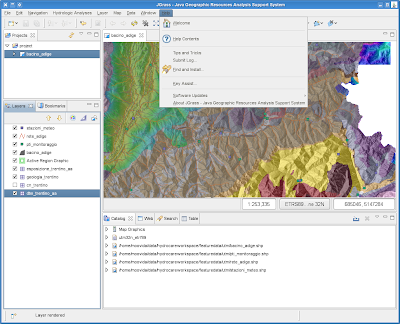
And send us the content of everything that has been logged.
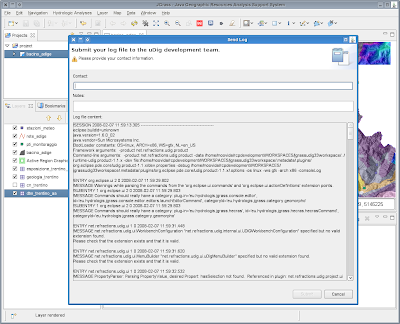
Please use that thing :)
The new JGrass has a solution to all this given by the Eclipse/Udig framework, which is the possibility to log the errors and let the user send the log to some poor guy that then has to understand what is happening. This is much better for us than the "doesn't work".
Obviously a developer will have to include some small snippet into his code to get the logging enabled. Here it is:
Step 1: insert the following code snippet into your Plugin Activator class
public static void log( String message2, Throwable t ) {
if (getDefault() == null) {
t.printStackTrace();
return;
}
String message = message2;
if (message == null)
message = ""; //$NON-NLS-1$
int status = t instanceof Exception || message != null ? IStatus.ERROR : IStatus.WARNING;
getDefault().getLog().log(new Status(status, PLUGIN_ID, IStatus.OK, message, t));
}
Step 2: call the logging method from every needed part of your code, i.e. everywhere an exception is thrown and you would like to know it.
For example in the JGrass catalog plugin that would look like:
try {
// ... your code
} catch (Exception e) {
JGrassPlugin.log("JGrassPlugin problem:eu.hydrologis.udig.catalog.internal.jgrass
#JGrassMapGeoResource#getIdentifier", e);
e.printStackTrace();
}
this would be an exception thrown inside the
class: JGrassMapGeoResource
package: eu.hydrologis.udig.catalog.internal.jgrass
method: getIdentifier
You do not think I wrote that by myself, right?
The Eclipse template engine helps you in this. If you want it the same as above, just add the following template to the java->editor->templates list (all in one line):
${pluginActivator}.log("${pluginActivator} problem:
${enclosing_package}#${enclosing_type}#
${enclosing_method}", ${throwable}); //$$NON-NLS-1$$
This will automagically insert the method-class-package, you just have to supply the plugin activator class name and the name of the exception.
If everything is done well then the user should be able to go under submit the log

And send us the content of everything that has been logged.

Please use that thing :)
Wednesday, February 6, 2008
How to easily add menus & actions to jface/swt viewers - adding a table row
Assume you created a nice new empty table to be filled by a user.
And let's say you created a first empty row with two columns.
what to do very quickly to add a new row?
After fiddling a bit around with listeners and such stuff, I decided to exploit the menus:
And how easy is the creation of the action?
Like that:
et voila', right-click on the table and tell it to add the new row.
And let's say you created a first empty row with two columns.
Listelements = new ArrayList ();
TableViewer tViewer = new TableViewer(parent, SWT.MULTI);
table = tViewer.getTable();
table.setLayoutData(new GridData(GridData.FILL_BOTH));
table.setHeaderVisible(true);
table.setLinesVisible(true);
TableLayout layout = new TableLayout();
layout.addColumnData(new ColumnWeightData(50, true));
table.setLayout(layout);
TableColumn dateColumn = new TableColumn(table, SWT.LEFT);
dateColumn.setText("DATE");
TableColumn dischargeColumn = new TableColumn(table, SWT.LEFT);
dischargeColumn.setText("DISCHARGE");
TableLabelProvider sLP = new TableLabelProvider(); // implement this yourself
tViewer.setLabelProvider(sLP);
tViewer.setContentProvider(new ArrayContentProvider());
// the empty row
elements.add(new String[]{"", ""});
// set the input
tViewer.setInput(elements);
what to do very quickly to add a new row?
After fiddling a bit around with listeners and such stuff, I decided to exploit the menus:
// add a popup for new rows
MenuManager popManager = new MenuManager();
IAction menuAction = new NewRowAction();
popManager.add(menuAction);
Menu menu = popManager.createContextMenu(table);
table.setMenu(menu);
And how easy is the creation of the action?
Like that:
private class NewRowAction extends Action {
public NewRowAction() {
super("Add a new row");
}
public void run() {
elements.add(new String[]{"", ""});
tViewer .refresh();
}
}
et voila', right-click on the table and tell it to add the new row.
Friday, January 25, 2008
How to threat threads right when in the wrong thread
Not sure if it is only me, but sometimes you are in a display thread and you need to stop to do others gui things like open a dialog and ask the user something, but there is confusion about wrong thread access exceptions and if not that, then perhaps, the thing doesn't stop were it should and... and... if you feel like that, like panic, just sit down again, take a deep break and look what good guys can show you (not me, but the eclipse guys :))
and then finally do whatever you have to do with the asked result.
goGo = false;
// create a thread and inside do a syncExec
Thread thread = new Thread(){
public void run() {
Display.getDefault().syncExec(new Runnable(){
public void run() {
SomeDialog someDialog = new SomeDialog();
someDialog.open(Display.getDefault().getActiveShell());
goGo = true;
}
});
}
};
thread.start();
// wait for the dialog to finish
while( !goGo ) {
try {
Thread.sleep(300);
} catch (InterruptedException ex) {
ex.printStackTrace();
}
}
and then finally do whatever you have to do with the asked result.
Thursday, January 24, 2008
How to solve the rcp-mozilla-browser exception problem in linux
As most of you probably know, the Eclipse-rcp environment uses native GUI resources, which steals to java the whole portability fun. The nice thing about it is that SWT looks 1000000 times better than swing (in the author's opinion).
One problem that could occur, is that some of the underlying resource is not found from time to time, as for example in the case of Linux OS and the swt browser widget.
The error thrown in that case is something like:
Exception in thread "Thread-3" org.eclipse.swt.SWTError: No more
handles [Unknown Mozilla path (MOZILLA_FIVE_HOME not set)]
at org.eclipse.swt.SWT.error(SWT.java:3589)
at org.eclipse.swt.browser.Mozilla.create(Mozilla.java:292)
at org.eclipse.swt.browser.Browser.(Browser.java:109)
at...
It seems that the environmental variable MOZILLA_FIVE_HOME has not been set, so let's try to set it.
In my case I add to my .bashrc the following line:
export MOZILLA_FIVE_HOME=/usr/lib/mozilla-firefox/
and magic is done! (please take care that the folder is the right one. For example on my newest linux it is: /usr/lib/firefox/)
If the magic at that point should not be done, then probably you need to run:
sudo apt-get install xul-runner
One problem that could occur, is that some of the underlying resource is not found from time to time, as for example in the case of Linux OS and the swt browser widget.
The error thrown in that case is something like:
Exception in thread "Thread-3" org.eclipse.swt.SWTError: No more
handles [Unknown Mozilla path (MOZILLA_FIVE_HOME not set)]
at org.eclipse.swt.SWT.error(SWT.java:3589)
at org.eclipse.swt.browser.Mozilla.create(Mozilla.java:292)
at org.eclipse.swt.browser.Browser.
at...
It seems that the environmental variable MOZILLA_FIVE_HOME has not been set, so let's try to set it.
In my case I add to my .bashrc the following line:
export MOZILLA_FIVE_HOME=/usr/lib/mozilla-firefox/
and magic is done! (please take care that the folder is the right one. For example on my newest linux it is: /usr/lib/firefox/)
If the magic at that point should not be done, then probably you need to run:
Wednesday, January 23, 2008
How to join the JGrass development
There is an effort ongoing to create a n uptodate documentation on the JGrass wiki at the following page:
http://jgrass.wiki.dev.fsc.bz.it/jgrass/Setup_Development_Environment
Please give feedback on the manual, we are working on it and need to know where the problems are.
Note that the howto was kept on one single site in order to be able to export the tutorial as a pdf manual.
WARNING
THE PART BELOW THIS LINE IS KEPT ONLY FOR THE RECORD, IT IS NO MORE UPTODATE:
To develop on JGrass you need 2 things to start:
1) the udig development environment + some additional plugins needed by JGrass
There is a very nice quickguide from the udig community here to get started.
We supply the target platform needed to develop. This is the udig sdk plus some more plugins added that are needed by JGrass. These are from the eclipse framework, mainly due to the fact that we have a console and this one needs some editor addons.
You can get this all here just choose the latest. The content of this has to be set as target platform in your eclipse plugin development environment.
2) the whole infinity of JGrass plugins :)
At the moment there is no official release, therefore they have to be checked out from the official SVN repository, i.e. take all you can get from here. or simply do from commandline:
svn checkout https://svn.dev.cocos.bz//svnroot/jgrass/jgrass3.0/trunk
SOME NOTES:
last updated 2008_03_26
http://jgrass.wiki.dev.fsc.bz.it/jgrass/Setup_Development_Environment
Please give feedback on the manual, we are working on it and need to know where the problems are.
Note that the howto was kept on one single site in order to be able to export the tutorial as a pdf manual.
WARNING
THE PART BELOW THIS LINE IS KEPT ONLY FOR THE RECORD, IT IS NO MORE UPTODATE:
To develop on JGrass you need 2 things to start:
1) the udig development environment + some additional plugins needed by JGrass
There is a very nice quickguide from the udig community here to get started.
We supply the target platform needed to develop. This is the udig sdk plus some more plugins added that are needed by JGrass. These are from the eclipse framework, mainly due to the fact that we have a console and this one needs some editor addons.
You can get this all here just choose the latest. The content of this has to be set as target platform in your eclipse plugin development environment.
2) the whole infinity of JGrass plugins :)
At the moment there is no official release, therefore they have to be checked out from the official SVN repository, i.e. take all you can get from here. or simply do from commandline:
svn checkout https://svn.dev.cocos.bz//svnroot/jgrass/jgrass3.0/trunk
SOME NOTES:
- trunc - here you find the base plugins, these should always work. Blame me if they don't!
- community/moovida - this is my playground, so don't be too scared. Not all of the plugins are ready to rumble, but some of them will soon go trunc. What does NOT work or is NOT needed (i.e. DON'T blame me if they do not work):
- eu.hydrologis.jgrass.advancedstyletest - is just a test for SLD stuff
- eu.hydrologis.jgrass.mapgraphicdragger - drag legends and so for a walk
- eu.hydrologis.jgrass.chart - has been a try for a view with BIRT charting
- eu.hydrologis.jgrass.dwgdxf.datastores - this will come whenever there will be founds for it
- eu.hydrologis.jgrass.feature - this is useless, for now
- eu.hydrologis.jgrass.java2c2fortran.and.back - an example for bridging java-C-fortran in udig. Wrapped in an operation.
- eu.hydrologis.jgrass.renderer.sites - renderer for old GRASS sites, not maintained for now
- eu.hydrologis.jgrass.tools
- eu.hydrologis.jgrass.ui
- eu.hydrologis.jgrass.visad.libs - needs java3d
- eu.hydrologis.jgrass.visad.view - needs java3d
last updated 2008_03_26
Sunday, January 20, 2008
How to check the operating system type and architecture
even if java is superportable (:]), more than often we need to execute operating dependent stuff. The rcp environment helps a lot in this:
if (Platform.getOS().equals(Platform.OS_WIN32)) {
// do windows specific stuff
}else if (Platform.getOS().equals(Platform.OS_LINUX)) {
// do linux specific stuff
}else if (Platform.getOS().equals(Platform.OS_MACOSX)) {
// do macosx specific stuff
}else{
// throw exceptions
}
if (Platform.getOS().equals(Platform.OS_WIN32)) {
// do windows specific stuff
}else if (Platform.getOS().equals(Platform.OS_LINUX)) {
// do linux specific stuff
}else if (Platform.getOS().equals(Platform.OS_MACOSX)) {
// do macosx specific stuff
}else{
// throw exceptions
}
Friday, January 11, 2008
How to deal with the svn Checksum mismatch
I have this bad habbit to forget that I work in an svn environment and sometimes remove-copy-edit-trash-and-whatever files and folders by hand.
In an eclipse plugin environment (and not only) this can lead to great problems because of the lost sync between the local and remote repositories.
The result is something like:
commit -m "" /home/moovida/rcpdevelopment/WORKSPACES/jgrassudig33workspace/eu.hydrologis.jgrass.charting.jfreechart.libs/META-INF/MANIFEST.MF
Sending /home/moovida/rcpdevelopment/WORKSPACES/jgrassudig33workspace/eu.hydrologis.jgrass.charting.jfreechart.libs/META-INF/MANIFEST.MF
Transmitting file data ...
svn: Commit failed (details follow):
svn: Checksum mismatch for '/home/moovida/rcpdevelopment/WORKSPACES/jgrassudig33workspace/eu.hydrologis.jgrass.charting.jfreechart.libs/META-INF/MANIFEST.MF'; expected: 'e59ba98152ab43ed640cdf076b0cdc51', actual: '0fad1171d44dba8be24547671ef6b510'
Well, after trying to replace the local file with the remote one a couple of times:
revert -N /home/moovida/rcpdevelopment/WORKSPACES/jgrassudig33workspace/eu.hydrologis.jgrass.charting.jfreechart.libs/META-INF/MANIFEST.MF
Reverted /home/moovida/rcpdevelopment/WORKSPACES/jgrassudig33workspace/eu.hydrologis.jgrass.charting.jfreechart.libs/META-INF/MANIFEST.MF
The problem wasn't fixed yet.
The real problem is in those nice hidden svn-something files in every folder. They keep track of everything that happens.
So the deal is to remove the folder containing the corrupted file and update again.
At that point do your changes and commit. It will do so.
In an eclipse plugin environment (and not only) this can lead to great problems because of the lost sync between the local and remote repositories.
The result is something like:
commit -m "" /home/moovida/rcpdevelopment/WORKSPACES/jgrassudig33workspace/eu.hydrologis.jgrass.charting.jfreechart.libs/META-INF/MANIFEST.MF
Sending /home/moovida/rcpdevelopment/WORKSPACES/jgrassudig33workspace/eu.hydrologis.jgrass.charting.jfreechart.libs/META-INF/MANIFEST.MF
Transmitting file data ...
svn: Commit failed (details follow):
svn: Checksum mismatch for '/home/moovida/rcpdevelopment/WORKSPACES/jgrassudig33workspace/eu.hydrologis.jgrass.charting.jfreechart.libs/META-INF/MANIFEST.MF'; expected: 'e59ba98152ab43ed640cdf076b0cdc51', actual: '0fad1171d44dba8be24547671ef6b510'
Well, after trying to replace the local file with the remote one a couple of times:
revert -N /home/moovida/rcpdevelopment/WORKSPACES/jgrassudig33workspace/eu.hydrologis.jgrass.charting.jfreechart.libs/META-INF/MANIFEST.MF
Reverted /home/moovida/rcpdevelopment/WORKSPACES/jgrassudig33workspace/eu.hydrologis.jgrass.charting.jfreechart.libs/META-INF/MANIFEST.MF
The problem wasn't fixed yet.
The real problem is in those nice hidden svn-something files in every folder. They keep track of everything that happens.
So the deal is to remove the folder containing the corrupted file and update again.
At that point do your changes and commit. It will do so.
How to open a view from an action and maximize it programmatically
You want to open an rcp view to be maximized over the open parteditors in order to gain user's focus on that? That is how to do it:
IWorkbenchPage activePage = window.getActivePage();
if (activePage.findView(SimulationViewer.ID) == null) {
try {
// open the view
activePage.showView(SimulationViewer.ID);
// and maximize it
activePage.toggleZoom(activePage.findViewReference(SimulationViewer.ID));
} catch (PartInitException es) {
es.printStackTrace();
}
}
The view will be maximized if it wasn't and vice versa.
Have to find out how to deal with the fact that when I close the view the other views of the group stay maximized, whereas the user will want to get back to its part editors. Any idea?
IWorkbenchPage activePage = window.getActivePage();
if (activePage.findView(SimulationViewer.ID) == null) {
try {
// open the view
activePage.showView(SimulationViewer.ID);
// and maximize it
activePage.toggleZoom(activePage.findViewReference(SimulationViewer.ID));
} catch (PartInitException es) {
es.printStackTrace();
}
}
The view will be maximized if it wasn't and vice versa.
Have to find out how to deal with the fact that when I close the view the other views of the group stay maximized, whereas the user will want to get back to its part editors. Any idea?
Subscribe to:
Posts (Atom)


